Genograms that stay in the file.
A genogram editor for therapists, social workers and clinicians. Draw a family at intake, update it between sessions, print it on one page. It works offline with no account, and its symbols follow McGoldrick's published genogram notation. End-to-end encrypted sync between your devices is coming soon.
What's in the kit
Everything a genogram needs.
A genogram is a family tree that also shows relationships, health and loss. Genosketch draws it in the notation clinicians learn from McGoldrick, so your charts read the way colleagues expect.
The full notation
Ages and dates, deaths, pregnancies and losses, illness and addiction fills, twins and labels.
Every relationship
Marriage to divorce, adopted and foster children, households, and emotional patterns from close to cut off.
Automatic layout
One key lays out the whole family neatly, generation by generation.
Print & export
Print on one page or save a PDF. Export PNG, SVG and EMF, or GEDCOM and CSV.
Draw by hand
Circle, underline or annotate with a finger, Apple Pencil, pen or mouse.
Data checks
Flags impossible dates and likely mistakes before the chart goes in the file.
Exhibit A
The app itself.
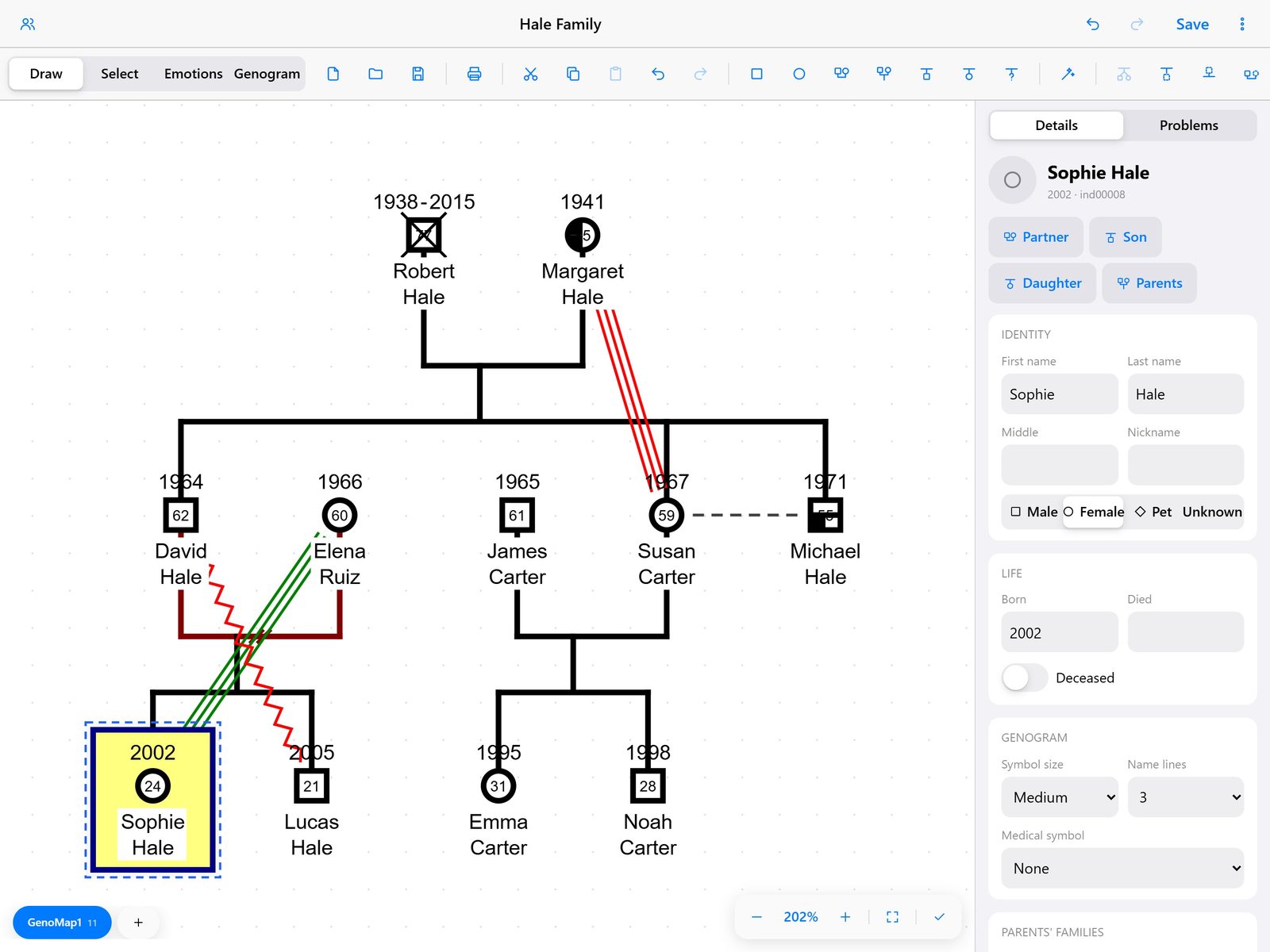
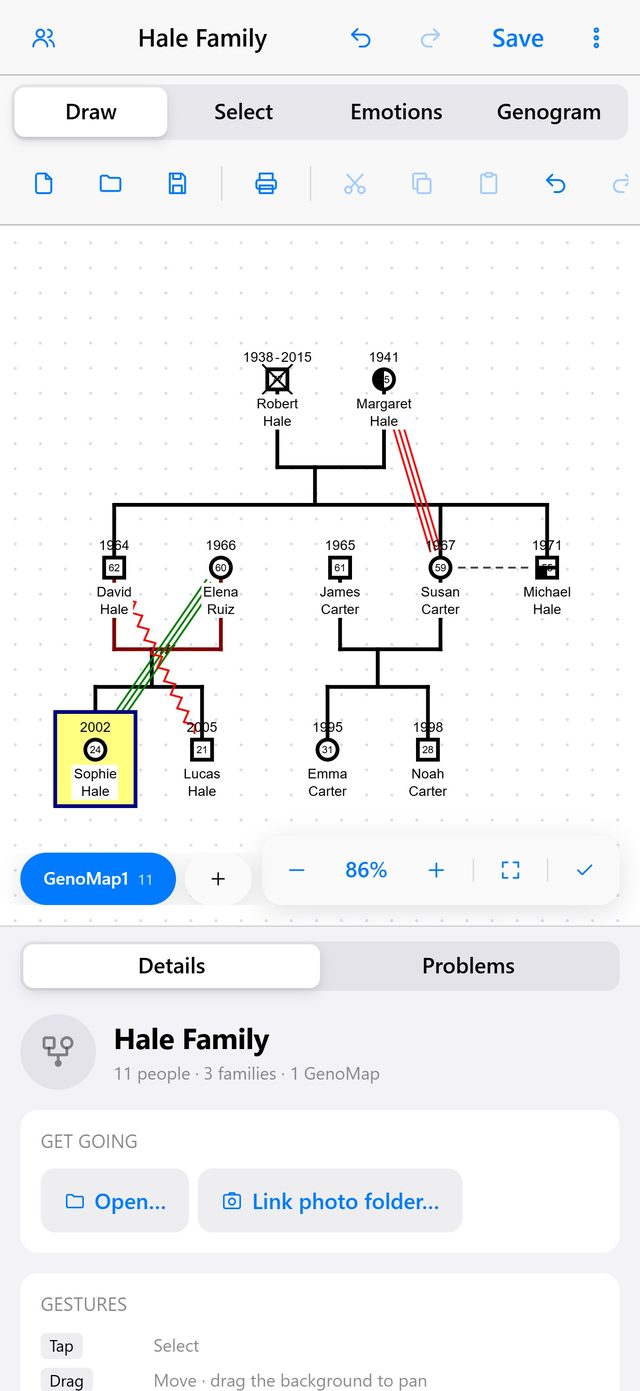
The Hale family (fictional) on an iPad and an iPhone. Double-tap a person to edit their details; the genogram redraws as you go.
Procedure
From intake notes to a printed genogram.
- Add peoplePress M for a man or W for a woman. Type the name, age and dates in the panel beside the drawing.
- Connect themF adds a partner, S and D a son or daughter, P the parents, E an emotional relationship.
- ArrangePress A. The whole family is laid out cleanly, generation by generation.
- File itSave a .gno file wherever your organisation keeps records, or print it on a single page.
Memo
Drawn by the book.
A genogram is only useful if the next clinician reads it the same way you do. Genosketch follows Monica McGoldrick's notation for family-therapy genograms, and the National Society of Genetic Counselors' nomenclature for medical pedigrees. Switch between them under View › Symbol notation.
References
- McGoldrick, M., Gerson, R., & Petry, S. (2020). Genograms: Assessment and Treatment (4th ed.). W. W. Norton.
- McGoldrick, M. (2023). Genogram How-To. Multicultural Family Institute.
- Bennett, R. L., et al. (2022). Standardized pedigree nomenclature update centered on sex and gender inclusivity: A practice resource of the National Society of Genetic Counselors. Journal of Genetic Counseling, 31(6). doi:10.1002/jgc4.1621
- French, J. M., Bennett, R. L., & Resta, R. G. (2025). Correction to the 2022 standardized pedigree nomenclature update. Journal of Genetic Counseling. doi:10.1002/jgc4.2020
Only you can read your clients' information.
Genosketch works entirely on your device. It has no accounts and nothing to sign in to, and it never sends your files to us.
Genosketch never
- asks you to create an account
- uploads or shares your files
- collects analytics, telemetry or crash reports
- checks for updates by itself or downloads web pictures
- writes logs in the released apps
The native apps go further: their security policy blocks every network connection.
You stay in control
- Files open and save only where you choose
- Photos come from your own folders
- Encrypted backups use a password only you know
Coming soon: encrypted sync
- Optional, and off until you turn it on
- Encrypted on your device; only your devices hold the keys
- A HIPAA business associate agreement for every sync customer
HIPAA: Genosketch never receives client data, so it doesn't act as a business associate. Keep devices encrypted (BitLocker, FileVault, or iOS and Android encryption) and screen-locked, and store .gno files where your organisation approves health records. When encrypted sync arrives, we'll sign a business associate agreement (BAA) with every sync customer. Read the full privacy policy.
Used by
Made for the people who map families.
Download
Get Genosketch.
Windows and Mac are ready to download now. The iPad, iPhone and Android versions are on their way.
Notes for the file
Questions.
Which files can it open?
.gno genogram files, genogram XML and GEDCOM (.ged) family trees. Genosketch saves .gno files and keeps any details it doesn't edit, such as sources, places and pictures, exactly as they were.
Which symbols does it use?
McGoldrick's family-therapy notation by default, or the NSGC medical pedigree nomenclature (2022, corrected 2025). Change it under View › Symbol notation; your recorded relationships stay the same.
Where is my data stored?
Only in the files you choose, on your own device. There are no accounts and no cloud, and nothing is sent to us, not even usage statistics or crash reports.
Can I sync between devices?
Encrypted sync is coming soon. It will be off until you turn it on, and each genogram will be encrypted on your device before it's uploaded, so only your own devices can read it. Until then, copy the .gno file between devices, or use an encrypted backup.
Is it HIPAA compliant?
Genosketch never receives your clients' information, so it doesn't act as a business associate. Compliance then depends on your device: use full-disk encryption, a screen lock and storage your organisation has approved for health information. When encrypted sync arrives, storing even encrypted files will make us a business associate, so we'll sign a business associate agreement (BAA) with every sync customer.
Which devices does it run on?
Windows and macOS today, with iPad, iPhone and Android coming soon. The same file opens on all of them.
Can I print or share a genogram?
Print it on a single page, or save it as a PDF from the print dialog. You can also export a high-resolution PNG, an SVG or an EMF for reports and case notes.
I have a problem or a question.
Email support@genosketch.com or see the support page. Please don't send real client files: describe the problem, or send a copy with the names removed.
Do I need to know genogram notation?
It helps, but every tool is labelled, the shortcuts are listed beside the drawing, and the data checks flag likely mistakes as you go.